

Tab “Recurrence Date Time”
Configure the following items in Recurrence Date Time tab:
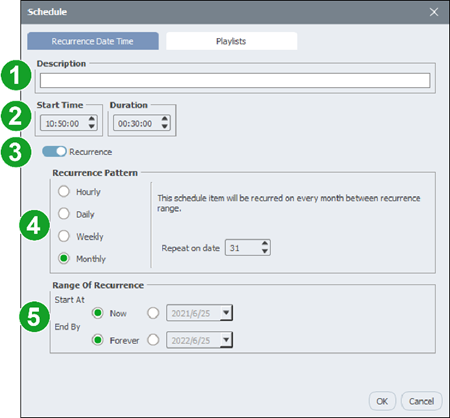
| No. | Item | Description |
| 1 | Description | Enter the name or description for the schedule item. |
| 2 | Start Time / Duration | If the schedule item is a recurring event (if #3 is sent to Recurrance), set Start Time to the time of the day when you want the schedule item to activate and then set how long you want the item to be active in the Duration field. If the schedule item is a one-time event (if #3 is sent to Once), set the Start Date and End Date in the respective field. |
| 3 | Recurrence / Once | Set this item to Recurrence if you want the schedule item to repeat. Set this item to Once if you want the schedule item to be a one-time event. |
| 4 | Recurrence Pattern | If Recurrence is selected in #3, select one of the following options. Hourly – Schedules the event to occur every number of hours at the time entered in the Start Time field. Set the number of hours between each occurrence in the Repeat every hour(s) field.Daily – Schedules the event to occur every day of the week.Weekly – Schedules the event to occur on days of the week selected.Monthly – Schedules the event to occur at the date selected in the Repeat on date field for every month. |
| 5 | Range of Recurrence | If Recurrence is selected in #3, configure the following options: In the Start At field, select Now if you want the schedule item to activate immediately, or enter the date that you want the schedule item to be activated.In the End By field, select Forever if you want the schedule item to continue into the future, or enter the date that you want the schedule item to be deactivated. |
